FAQ
What power supply is required for the SeedHammer II?
A 100W USB-C power supply is required but we strongly recommend a 140W power supply.
A charger with a single port is preferred, but not required.
Which plates are supported by the SeedHammer II?
SeedHammer II Plates and SH02 Steel Plates.
Dimensions: 85mm x 85mm.
Why is the display black when I plug in the SeedHammer II?
If the screen does not turn on when you plug in the machine, it is usually caused by one of two things: an insufficient power supply or a loose internal cable.
- Insufficient Power Supply
- Loose LCD Screen Connection
If you connect a charger that provides less than 100W, the machine will intentionally refuse to start and reboot into firmware upgrade mode, where the screen is black.
Solution: Ensure you are using a capable 100W or 140W USB-C power source.
If the screen still stays black, the internal LCD ribbon cable may be slightly misaligned or loose.
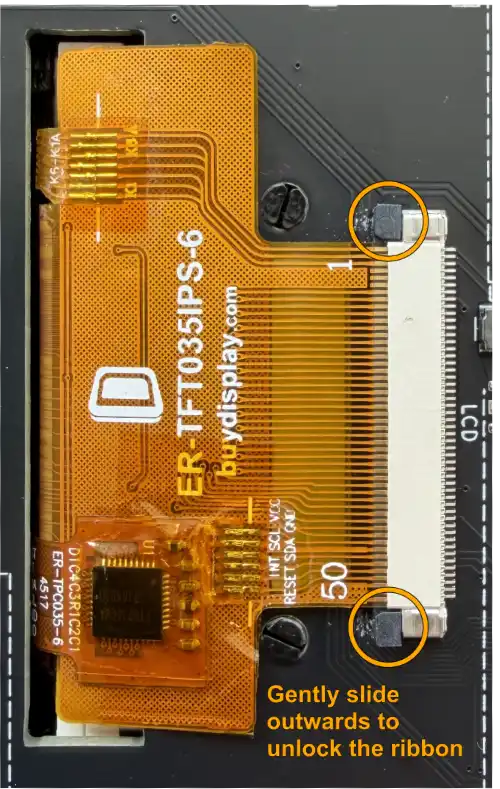
Solution: Reseat the cable. Carefully open the connector locks that secure the LCD ribbon cable to the PCB. Gently push the ribbon cable all the way into the connector so it sits straight, keep it in place, and firmly close the locking tabs again.
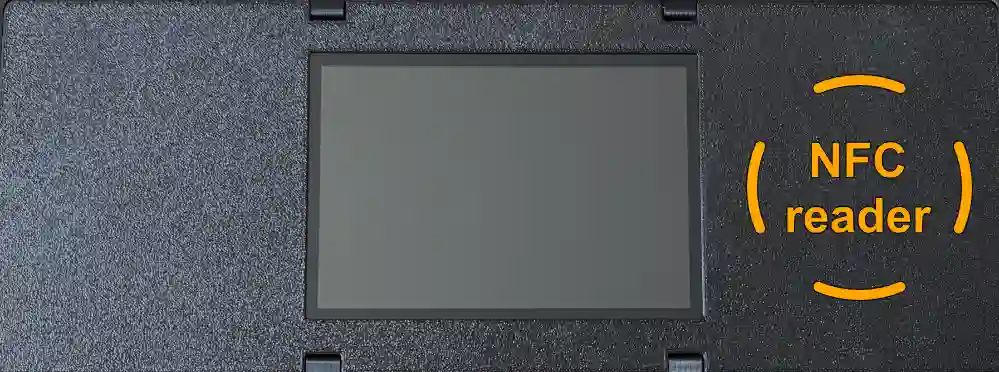
Where is the NFC reader on SeedHammer II?
The NFC antenna is located right next to the display screen, on the right side.
Link below on how to transfer a descriptor:
Can I backup solely the seed phrase of a setup?
Yes, you can back up exclusively the seed, omitting the descriptor part of the setup. This approach gives a complete set of plates, without a descriptor. Consequently, they will remain blank on the side designated for the descriptor.
Upon being prompted to hammer the first side of a plate, engage the dry-run mode (further details can be found here). Remember to deactivate the dry-run mode before proceeding to hammer the second side (the seed side).
Can I backup a passphrase-protected wallet?
Yes, from version v1.1.1 and forward.
Note that backing up a passphrase-protected multisig wallet is not possible, as matching the seed with the descriptor part becomes impossible.
A workaround for passphrase-protected multisig wallets is to back up each share as a single signature wallet and, optionally, skip the descriptor side. However, this approach will result in the loss of the unique feature of a self-contained setup.
What do you mean by "self-contained" setup?
This means that the minimum amount of shares (physical plates) is enough to recover the wallet, and the need for storing a copy of the XPUBs (often in the form of a descriptor) digital or on paper along each backup/plate is eliminated.
Read more about the technical solution we used to achieve this in our article The SeedHammer Descriptor Partitioning Scheme.
What are the weaknesses of SeedHammer?
See our article on attack vectors.
Can I buy the SeedHammer machine elsewhere?
The SeedHammer machine is a off-the-shelf industrial electric marking machine for making nameplates etc.
It can be bought in various online hardware stores - however physical alterations are needed to function as a SeedHammer.
Which wallet types can I backup with SeedHammer?
It is possible to backup both single and multisig setups. However there are some guidelines for which type of plates to use for each setup.
Read about our steel plates and supported formats in our article The Seedhammer Metal Plates.
What is the difference between the plates (SH01, SH02 and SH03)?
SH01 is credit card sized, SH02 is square, and SH03 is rectangular. All are made of 3 mm stainless steel 316.
The sizes of the plates determine which type of wallet setup that can be engraved on them.
Read more about this in our article The Seedhammer Metal Plates.
Do you ship to anywhere in the world?
Yes, we ship worldwide with very few exceptions.
Are you in doubt contact us at support@seedhammer.com.
Can I write a title on the plates?
Yes, from version v1.2.0 and forward.
When scanning descriptors from compatible wallet software, the wallet title will be shown on the descriptor information screen and engraved on the plate (max. 18 characters, limited character set).
The compatible wallets are: BlueWallet (vaults only), Nunchuk wallets and wallets capable of exporting descriptors in one of those formats.
When using Sparrow Wallet exporting descriptors in the following formats also work: Jade Multisig, Keystone Multisig, Passport Multisig, and Specter Desktop.
What is the difference between SeedHammer and the many other steel backup solutions?
The main difference is that SeedHammer can make self-contained multisig backups.
This means that the minimum amount of shares (physical plates) is enough to recover the wallet, and the need for storing a copy of the XPUBs (often in the form of a descriptor) digital or on paper along each backup/plate is eliminated.
There are also other benefits, such as QR codes for convenient recovery and signing, the ability to create distributed setups, gift cards, etc.
Moreover, precision engraving ensures that all information, such as the seed phrase and other text, is easily readable and discernible.
If you only ever need to back up a single 12- or 24-word bitcoin seed phrase many of the other steel backup solutions are most likely more suitable.
Will the SeedHammer controller generate a seed?
No, the SeedHammer software will never be able to generate a seed phrase because of the obvious vulnerabilities this approach would introduce. Read more here.